Backends
The Backends group has one pane for each CLI that Splitkick can use. Most panes have two parts: CLI source (which program Splitkick starts) and Default model. This page explains the shared parts one time, then the settings of each CLI. For an overview of the CLIs and the modes, see Agent CLIs and modes.
The model, thinking and effort settings here are defaults for new sessions. A session that already has its own model or level keeps it. You can change them per session in the chat toolbar.
CLI source
All CLI panes start with this card.
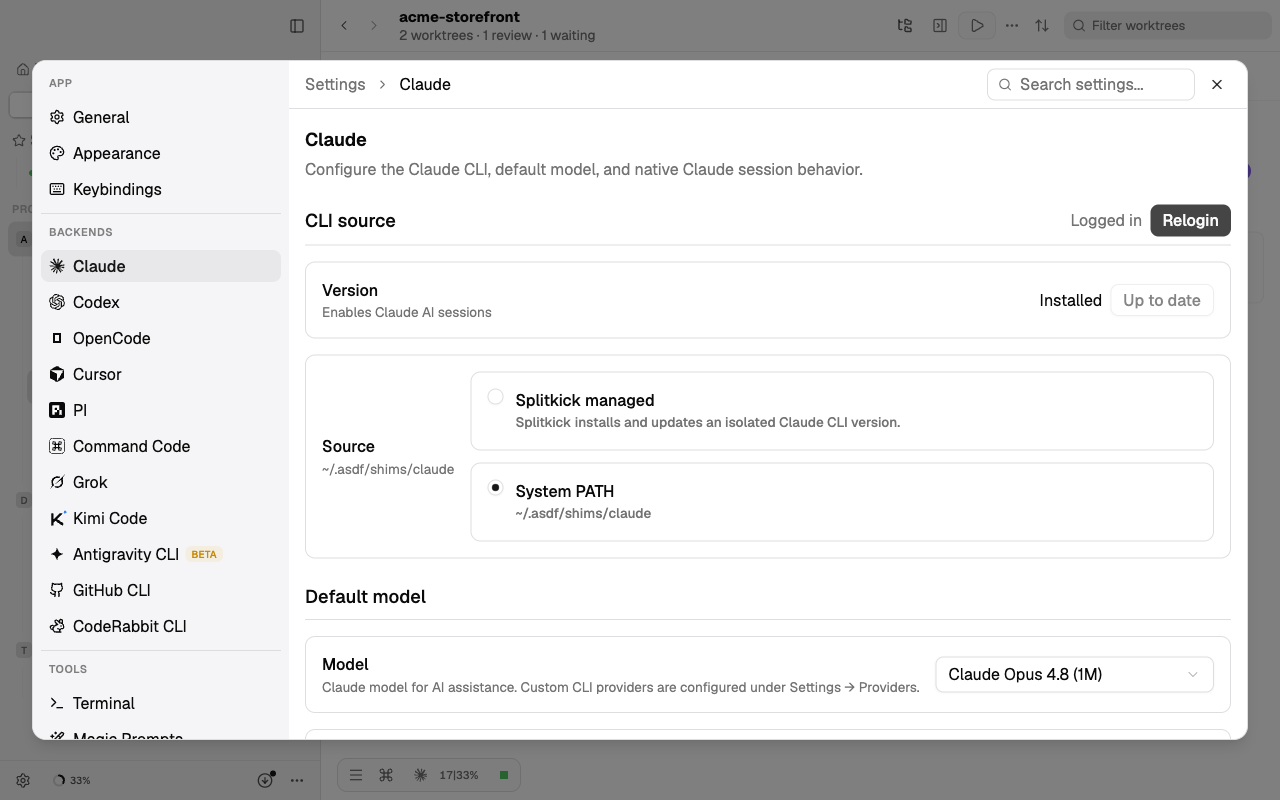
Source
Default: Splitkick managed
What it does: which program Splitkick starts.
- Splitkick managed: Splitkick installs its own copy of the CLI in its app data folder and updates it. It is separate from a copy on your PATH.
- System PATH: Splitkick uses the CLI that you installed yourself. The card shows its path and version. A click on the path copies it.
Splitkick reads the source each time it starts the CLI, so a change applies to the next run. A running turn keeps its program. If the selected source has no program, Splitkick uses the other one. Claude, Codex and OpenCode switch to System PATH by themselves when the managed copy is missing and your PATH has one.
Why change it: select System PATH when you want the same CLI version, configuration and updates as in your own terminal. Keep Splitkick managed when you do not want Splitkick to depend on your own installation.
Cost: a managed copy uses disk space in the app data folder, one copy per CLI. The installers download from the vendor of each CLI. PI, Command Code, Grok and Kimi Code are installed with npm, so they need npm on your PATH.
Version, Install, Update and Uninstall
Not settings, but the buttons on the card:
- Install / Update: for a managed CLI, you can select a stable version to install. For a CLI on your PATH, Splitkick runs the CLI's own update command, or Homebrew, or npm.
- Uninstall deletes the managed copy and switches the source to System PATH.
- Automatic updates are a separate setting: Auto-update AI backends.
Login / Relogin
Opens a terminal in Splitkick that runs the login command of the CLI, for example claude auth login or codex login --device-auth. The CLI keeps its login itself, Splitkick does not store it. Login first checks if you are logged in already. Relogin always opens the terminal. For PI, the login screen is also where you change the PI provider.
Steer running turn
Codex, OpenCode, PI, Grok and Kimi Code have this switch in Default model.
Default: on (Kimi Code: off)
What it does: when you send a message while the agent works, Splitkick puts the message into the running turn, so the agent reads it at once. When it is off, the message waits in the queue and starts a new turn after the current one. With the switch off, you can still steer one message: press ⌘↩ (Ctrl+Enter) to send it. The change applies at once, also to running sessions.
On Windows, PI messages always wait in the queue. For Kimi Code the switch has no effect in this version: messages always wait.
Why change it: turn it off when you want each message to be its own turn, for example to see the result of each step before the next one.
Cost: none. A steered message does not start a new turn.
Claude
Accounts
You can use several Claude accounts and switch between them. The full guide is Several Claude accounts.
Model
Default: Opus 5.5
What it does: the Claude model for new sessions, and for sessions that have no model of their own. The list comes from a model catalog that Splitkick loads from GitHub every hour. "(1M)" means a context window of 1 million tokens. When you set a default provider, the list shows the models of that provider.
When you update from an older version and still use the old default Opus 4.8 (1M), Splitkick changes it to Opus 5.5 one time. If you select Opus 4.8 (1M) again later, Splitkick keeps your choice.
Why change it: a smaller model (Sonnet, Haiku) is faster and uses less of your plan. A larger model is better for difficult work.
Cost: larger models and long contexts use more usage quota or API spend per turn.
Thinking
Default: Ultrathink
What it does: shown only for models that use thinking levels. Off, Think (about 4,000 thinking tokens), Megathink (about 10,000) or Ultrathink (about 32,000).
Why change it: a lower level gives faster answers for simple work.
Cost: thinking tokens count as output tokens. Ultrathink can add up to about 32,000 tokens per turn, and the answer takes longer.
Effort
Default: High
What it does: shown for models that use effort levels (the newer Opus, Sonnet and Fable models). Low, Medium, High, Extra high, Max, and for some models Ultracode (Extra high with workflows). This value is also the default effort for OpenCode, PI and Kimi Code sessions.
Why change it: lower effort for fast, small tasks. Higher effort for difficult problems.
Cost: higher effort uses more tokens and takes longer. Ultracode can start more work.
Chrome browser integration
This setting is now in Settings → Web Browser. See Claude in Chrome.
Codex
On Linux, Codex needs bubblewrap for its sandbox. The pane shows a warning when it is missing.
Model
Default: GPT 5.6 Sol
What it does: the Codex model for new sessions. Models with a fast tier also show as "Fast".
Cost: the Fast tier answers sooner but uses more of your ChatGPT or OpenAI quota.
Reasoning effort
Default: High
What it does: Low, Medium, High, Extra high, and for some models Max and Ultra (Ultra delegates work automatically). The list depends on the model.
Cost: higher effort uses more tokens and takes longer.
Model verbosity
Default: Medium
What it does: how much text Codex writes between its tool calls. Low is short, with few progress notes. High explains more. It applies to the next message in every Codex session. Reviews and other structured calls always use Low.
Why change it: Low when you only want the result. High when you want to follow what Codex does.
Cost: High writes more output tokens.
Goal execution mode
Default: Build
What it does: when you type /goal <objective> in a Codex session, Splitkick saves the goal, switches the session to this mode and tells Codex to work toward the goal. /goal shows the goal, /goal clear removes it. Build asks before risky actions. Yolo runs without approvals and without a sandbox.
Why change it: select Yolo for long goals that must run unattended.
Cost: with Yolo, Codex can run any command without asking you.
Steer running turn
See Steer running turn.
Multi-Agent
Default: on
What it does: Codex can start subagents that work at the same time (experimental). It applies to the next message in every Codex session. While Parallel execution prompting in General is on, this setting stays on. To turn it off, first turn that one off.
Cost: each subagent uses tokens. The work finishes faster, but can use more quota in total.
Max agent threads
Default: 3
What it does: the maximum number of Codex subagents at the same time, from 1 to 8. Shown only when Multi-Agent is on.
Cost: more threads, more tokens at the same time.
OpenCode
Model
Default: GPT 5.6 Sol (OpenCode)
What it does: the OpenCode model for new sessions, in the form provider/model. The list comes from your OpenCode installation. Cost depends on the provider that OpenCode uses.
Steer running turn
See Steer running turn.
Cursor
Splitkick never manages Cursor: the source is always System PATH. Install and Update run Cursor's own installer and update command.
Model
Default: Auto
What it does: the Cursor model for new sessions. The list comes from the Cursor CLI. With Auto, Cursor selects the model. Usage counts against your Cursor plan.
PI
Model
Default: Sonnet (PI)
What it does: the PI model for new sessions. The models come from the active PI provider. To change the provider, use Login / Relogin. For your own PI providers, see Providers → PI.
Steer running turn
See Steer running turn. Not on Windows.
Command Code
Model
Default: CLI default
What it does: with CLI default, Command Code uses the model that you set in Command Code. Any other value sets the model for new sessions. Command Code has no steer setting.
Grok
Splitkick starts Grok with its own update check turned off. Updates come from Splitkick.
Model
Default: Grok 4.6
What it does: the Grok model for new sessions.
Reasoning effort
Default: High
What it does: Low, Medium, High, xHigh or Max, for new sessions.
Cost: higher effort uses more xAI credits and takes longer.
Steer running turn
See Steer running turn.
Kimi Code
Model
Default: Configured default
What it does: with Configured default, Kimi Code uses the model of its own configuration. Any other value sets the model for new sessions. Thinking for Kimi Code is on or off per session in the chat toolbar.
Steer running turn
Default: off. In this version the switch has no effect. See Steer running turn.
Antigravity CLI
The Antigravity pane has its own layout: CLI source, CLI installation, Authentication and Default model.
- CLI installation: install, update or remove the managed copy. The installer always installs the newest version, also when you select another version.
- Authentication: shows if you are signed in. Login opens the Antigravity start screen, where you sign in.
Default model
Default: Auto
What it does: the Antigravity model for new sessions. The list comes from the CLI.
GitHub CLI
The pane has only the CLI source card. The GitHub CLI is optional. Splitkick uses gh for issues, pull requests, CI status and the GitHub features; without it, these features show GitHub CLI is not set up. Claude sessions can run this gh without a permission prompt. See GitHub.
CodeRabbit CLI
The pane has only the CLI source card. CodeRabbit gives a second code review. If a coderabbit is on your PATH the first time, Splitkick uses it. The managed install works on macOS and Linux only. On Windows, install CodeRabbit in WSL or on your PATH.